



















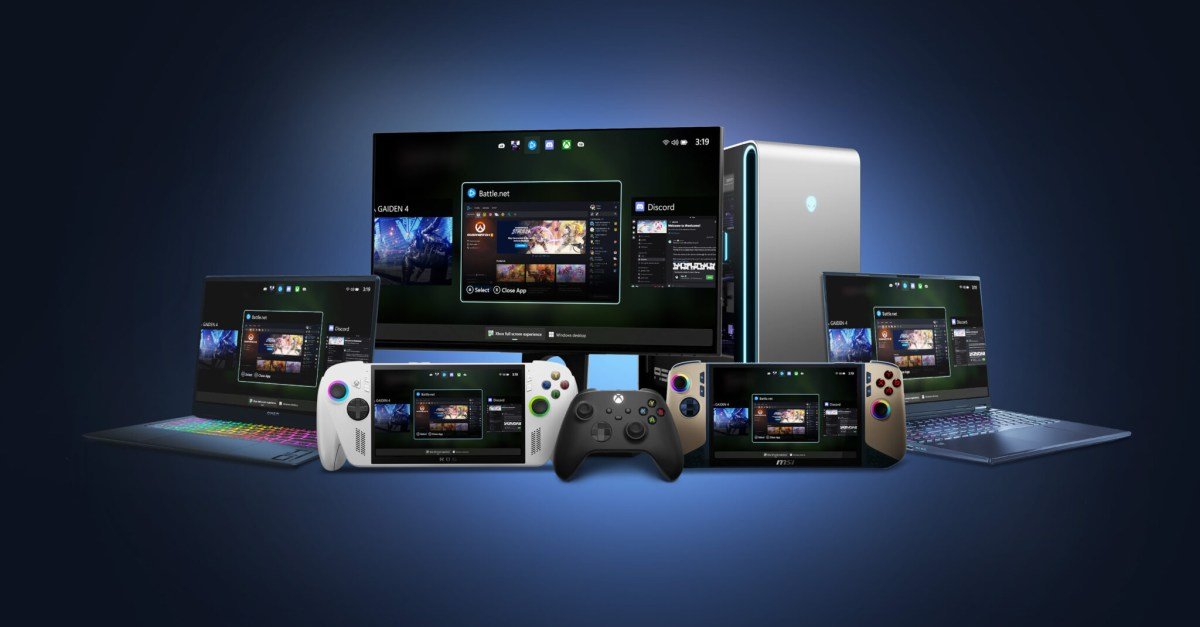
Xbox Goes Big (and Portable): Full Screen Experience Now Available on Any PC, Laptop, or Tablet
For years, the immersive and streamlined Xbox experience was largely confined to the console itself. But Microsoft is breaking down those walls, bringing a taste of the living room to your portable devices. Now, you can enjoy the Xbox Full Screen Experience on virtually any PC, laptop, or tablet, offering a more engaging and console-like environment for your Xbox Cloud Gaming adventures.
This move marks another significant step in Microsoft’s commitment to expanding the reach of Xbox and making gaming more accessible than ever. No longer are you tethered to your TV to enjoy the full glory of Xbox Game Pass Ultimate. Whether you’re on a train, waiting at the airport, or simply prefer gaming on your laptop, the Xbox experience is now ready to adapt to your lifestyle.
What is the Xbox Full Screen Experience?
Think of it as a miniature Xbox dashboard brought to your device. When accessed, the Full Screen Experience transforms your PC, laptop, or tablet screen into a dedicated Xbox interface. This means:
- Immersive Navigation: Forget fiddling with browser tabs or navigating complex menus. The familiar Xbox dashboard is right at your fingertips, allowing you to easily browse games, access your library, and discover new content.
- Streamlined Gameplay: Launching games is quicker and more intuitive. The experience is designed to prioritize your gaming, minimizing distractions and maximizing immersion.
- Controller Optimization: The Full Screen Experience is perfectly tailored for controller use. Navigation is seamless, and the button layouts are consistent with the console experience.
- Enhanced Visuals: While streaming quality depends on your internet connection, the Full Screen Experience aims to optimize visuals for your specific device, providing a clearer and more visually appealing gaming experience.
How to Access the Xbox Full Screen Experience:
Getting started is incredibly simple:
- Ensure you have Xbox Game Pass Ultimate: This is required to access Xbox Cloud Gaming.
- Open a compatible browser: Microsoft Edge, Chrome, or Safari are all known to work well.
- Navigate to Xbox Cloud Gaming: Go to xbox.com/play in your browser.
- Sign in with your Microsoft Account: Use the account associated with your Xbox Game Pass Ultimate subscription.
- Look for the Full Screen icon: Once logged in, you should see a full-screen icon (often a square with arrows pointing outwards) either on the main page or within the game you’re playing.
- Click the icon to enter Full Screen mode: Enjoy the enhanced Xbox experience!
Why This Matters for Gamers:
The introduction of the Xbox Full Screen Experience on PCs, laptops, and tablets is a game-changer for several reasons:
- Increased Accessibility: It makes Xbox gaming more accessible to those who don’t own a console or who want to game on the go.
- Flexibility and Convenience: You can now enjoy your favorite Xbox games virtually anywhere with a decent internet connection.
- A More Polished Experience: The dedicated interface provides a more refined and immersive gaming experience compared to simply streaming games in a browser window.
- Future Potential: This is likely just the beginning. As Xbox Cloud Gaming continues to evolve, expect even more features and improvements to be integrated into the Full Screen Experience.
The Verdict:
The Xbox Full Screen Experience is a welcome addition to the Xbox ecosystem. It’s a simple yet effective way to bring the console experience to your PC, laptop, or tablet, offering a more engaging and convenient way to enjoy Xbox Cloud Gaming. If you’re an Xbox Game Pass Ultimate subscriber, give it a try – you might just find your new favorite way to game. Microsoft is clearly committed to breaking down barriers and making gaming more accessible, and this is another significant step in that direction. Now, grab your controller and get ready to experience Xbox in a whole new way!