










• About
  • Advertise
  • Privacy & Policy
  • Contact
Tech News, Magazine & Review WordPress Theme 2017
  • Home
  • Review
    Our first five impressions of Googlebooks — exciting but underbaked

    Our first five impressions of Googlebooks — exciting but underbaked

    This toolless modular lever-action wallet is the coolest I’ve stuck to my phone

    This toolless modular lever-action wallet is the coolest Ive stuck to my phone

    OpenAI’s Dot agent is enterprise software that can also order your dinner

    OpenAIs Dot agent is enterprise software that can also order your dinner

    The Sonos Ace Ultra are the headphones Sonos should have made the first time

    The Sonos Ace Ultra are the headphones Sonos should have made the first time

    Nothing’s new flagship Headphone 1 Pro put you in the studio

    Nothings new flagship Headphone 1 Pro put you in the studio

    Can an ‘eSUV’ e-bike really go from trail to town?

    Can an ‘eSUV’ e-bike really go from trail to town?

  • Gaming
    Netflix expands TV game lineup with Conjuring spinoff

    Netflix expands TV game lineup with Conjuring spinoff

    Reverse-engineered games: All the news on video game decomps, recomps, VR and web and 3D ports

    Reverse-engineered games: All the news on video game decomps, recomps, VR and web and 3D ports

    An AI couldn’t beat humans at StarCraft, so it decided to cheat

    An AI couldnt beat humans at StarCraft, so it decided to cheat

    Capcom is preparing for a ‘future where we create games together with AI’

    Capcom is preparing for a future where we create games together with AI

    Nacon’s new PS5 controller can mix audio from your phone and console

    Nacons new PS5 controller can mix audio from your phone and console

    The Pocket Advance nearly perfects my favorite Nintendo handheld

    The Pocket Advance nearly perfects my favorite Nintendo handheld

  • Gear
    • All
    • Audio
    • Camera
    • Laptop
    • Smartphone
    Google admits not every Android app runs great on Intel Googlebooks

    Google admits not every Android app runs great on Intel Googlebooks

    The forgotten Chromebook that started it all

    The forgotten Chromebook that started it all

    HP’s answer to the MacBook Neo is thinner, lighter, and comes with OLED

    HP’s answer to the MacBook Neo is thinner, lighter, and comes with OLED

    Huawei made a whole camera to attach to its latest phone

    Huawei made a whole camera to attach to its latest phone

    Polaroid’s new instant camera has four creative shooting modes you can experiment with

    Polaroids new instant camera has four creative shooting modes you can experiment with

    Why OLPC’s $100 laptop never stood a chance

    Why OLPCs $100 laptop never stood a chance

    Trending Tags

    • Best iPhone 7 deals
    • Apple Watch 2
    • Nintendo Switch
    • CES 2017
    • Playstation 4 Pro
    • iOS 10
    • iPhone 7
    • Sillicon Valley
  • Computers

    To regain advertiser trust, Facebook is tracking ads by the millisecond

    Google has been asked to take down over a million websites

    Watch Dogs 2 Update Coming This Week, Here’s What It Does

    Fujifilm X-T2 review: The definition of a great camera

    Shopify CEO attempts to defend continued hosting of Breitbart’s online store

    SpaceX targets February 18 for Dragon resupply mission to ISS

  • Applications
    Apple’s new M6 Mac Mini is over $100 off

    Apples new M6 Mac Mini is over $100 off

    An open-source tool lets you delete 12GB of Apple Intelligence data on macOS

    An open-source tool lets you delete 12GB of Apple Intelligence data on macOS

    TCL’s paperlike OLED phone made me more excited for the iPhone Duo

    TCLs paperlike OLED phone made me more excited for the iPhone Duo

    The AirPods Pro 3 are a fantastic deal at $179

    The AirPods Pro 3 are a fantastic deal at $179

    The MacBook Air M5 is $200 off for the first time in months

    The MacBook Air M5 is $200 off for the first time in months

    The iPad Mini is slightly cheaper again during Prime Day

    The iPad Mini is slightly cheaper again during Prime Day

  • Security

    To regain advertiser trust, Facebook is tracking ads by the millisecond

    National Academy of Sciences endorses embryonic engineering

    Google has been asked to take down over a million websites

    Watch Dogs 2 Update Coming This Week, Here’s What It Does

    The Warby Parker of hair color, Madison Reed, scores new funding and a CMO

    Shopify CEO attempts to defend continued hosting of Breitbart’s online store

No Result
View All Result
  • Home
  • Review
    Our first five impressions of Googlebooks — exciting but underbaked

    Our first five impressions of Googlebooks — exciting but underbaked

    This toolless modular lever-action wallet is the coolest I’ve stuck to my phone

    This toolless modular lever-action wallet is the coolest Ive stuck to my phone

    OpenAI’s Dot agent is enterprise software that can also order your dinner

    OpenAIs Dot agent is enterprise software that can also order your dinner

    The Sonos Ace Ultra are the headphones Sonos should have made the first time

    The Sonos Ace Ultra are the headphones Sonos should have made the first time

    Nothing’s new flagship Headphone 1 Pro put you in the studio

    Nothings new flagship Headphone 1 Pro put you in the studio

    Can an ‘eSUV’ e-bike really go from trail to town?

    Can an ‘eSUV’ e-bike really go from trail to town?

  • Gaming
    Netflix expands TV game lineup with Conjuring spinoff

    Netflix expands TV game lineup with Conjuring spinoff

    Reverse-engineered games: All the news on video game decomps, recomps, VR and web and 3D ports

    Reverse-engineered games: All the news on video game decomps, recomps, VR and web and 3D ports

    An AI couldn’t beat humans at StarCraft, so it decided to cheat

    An AI couldnt beat humans at StarCraft, so it decided to cheat

    Capcom is preparing for a ‘future where we create games together with AI’

    Capcom is preparing for a future where we create games together with AI

    Nacon’s new PS5 controller can mix audio from your phone and console

    Nacons new PS5 controller can mix audio from your phone and console

    The Pocket Advance nearly perfects my favorite Nintendo handheld

    The Pocket Advance nearly perfects my favorite Nintendo handheld

  • Gear
    • All
    • Audio
    • Camera
    • Laptop
    • Smartphone
    Google admits not every Android app runs great on Intel Googlebooks

    Google admits not every Android app runs great on Intel Googlebooks

    The forgotten Chromebook that started it all

    The forgotten Chromebook that started it all

    HP’s answer to the MacBook Neo is thinner, lighter, and comes with OLED

    HP’s answer to the MacBook Neo is thinner, lighter, and comes with OLED

    Huawei made a whole camera to attach to its latest phone

    Huawei made a whole camera to attach to its latest phone

    Polaroid’s new instant camera has four creative shooting modes you can experiment with

    Polaroids new instant camera has four creative shooting modes you can experiment with

    Why OLPC’s $100 laptop never stood a chance

    Why OLPCs $100 laptop never stood a chance

    Trending Tags

    • Best iPhone 7 deals
    • Apple Watch 2
    • Nintendo Switch
    • CES 2017
    • Playstation 4 Pro
    • iOS 10
    • iPhone 7
    • Sillicon Valley
  • Computers

    To regain advertiser trust, Facebook is tracking ads by the millisecond

    Google has been asked to take down over a million websites

    Watch Dogs 2 Update Coming This Week, Here’s What It Does

    Fujifilm X-T2 review: The definition of a great camera

    Shopify CEO attempts to defend continued hosting of Breitbart’s online store

    SpaceX targets February 18 for Dragon resupply mission to ISS

  • Applications
    Apple’s new M6 Mac Mini is over $100 off

    Apples new M6 Mac Mini is over $100 off

    An open-source tool lets you delete 12GB of Apple Intelligence data on macOS

    An open-source tool lets you delete 12GB of Apple Intelligence data on macOS

    TCL’s paperlike OLED phone made me more excited for the iPhone Duo

    TCLs paperlike OLED phone made me more excited for the iPhone Duo

    The AirPods Pro 3 are a fantastic deal at $179

    The AirPods Pro 3 are a fantastic deal at $179

    The MacBook Air M5 is $200 off for the first time in months

    The MacBook Air M5 is $200 off for the first time in months

    The iPad Mini is slightly cheaper again during Prime Day

    The iPad Mini is slightly cheaper again during Prime Day

  • Security

    To regain advertiser trust, Facebook is tracking ads by the millisecond

    National Academy of Sciences endorses embryonic engineering

    Google has been asked to take down over a million websites

    Watch Dogs 2 Update Coming This Week, Here’s What It Does

    The Warby Parker of hair color, Madison Reed, scores new funding and a CMO

    Shopify CEO attempts to defend continued hosting of Breitbart’s online store

No Result
View All Result
earmpro - Latest Tech News & Reviews
No Result
View All Result
Home Review

Our first five impressions of Googlebooks — exciting but underbaked

admin by admin
October 6, 2026
Our first five impressions of Googlebooks — exciting but underbaked
Share on FacebookShare on Twitter

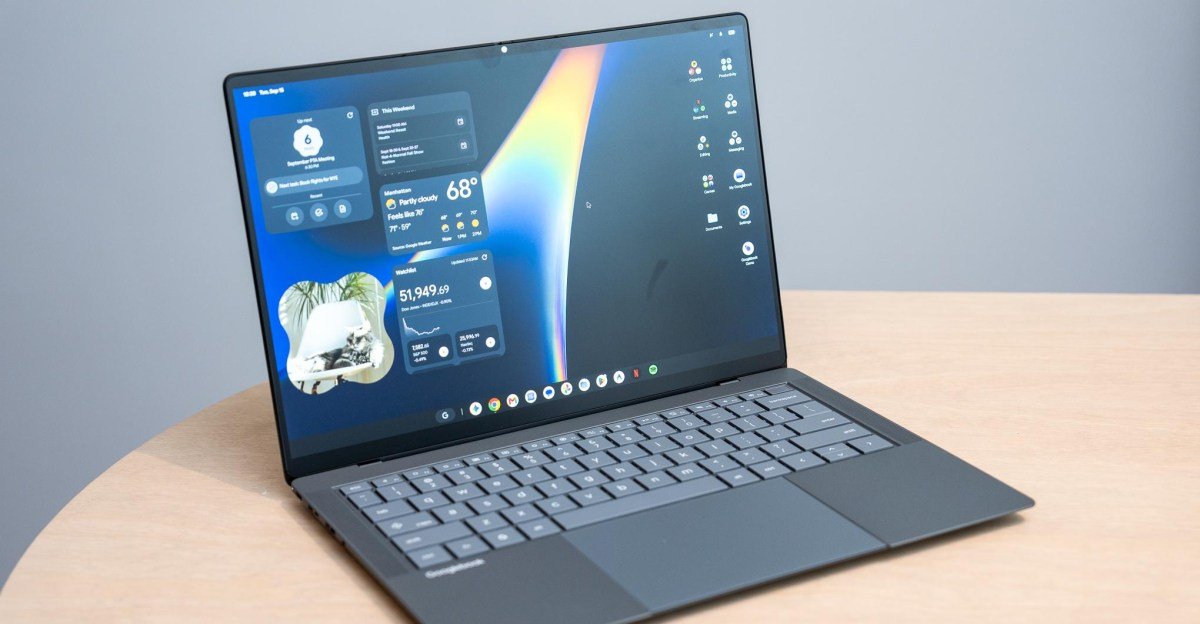
Googlebooks are here. The first models went on sale Sunday, October 4th, and we received review units of all five Googlebooks about 24 hours ago. Since then, we've been in a mad dash to put the devices through their paces and get a check on what it's like to use these Android laptops.

At first glance, Googlebooks feel very Chromebook-ish, and at times a little janky. But Google has some great new ideas afoot on how a laptop and phone interact. You can already link your phone to a Windows laptop to sync your notifications and mirror your whole iPhone on macOS. But Googlebooks allow you to take actions on your phone from your laptop in a way that feels natural. When it works, of course.

Here are all the things we're learning, feeling, and thinking about so far with Googlebooks. The good, the bad, and the weird.

The Android phone integrations are slick

All your Android phone apps are here in their own app drawer. And your phone files are readily available in the Googlebook Files app.

All your Android phone apps are here in their own app drawer. And your phone files are readily available in the Googlebook Files app.

Googlebooks revolve around using an Android phone, and Google's execution here is great. Setting up a Googlebook with an Android phone is simple and painless. The out-of-box experience is pretty intuitive, prompting you to pair your phone by scanning a QR code, sign into your Google account, and then download some of the apps you've already installed on your phone. It's similar to the most recent Chromebooks, but it's intuitive.

Casting apps from your phone, migrating a task from your phone to your laptop with a single click, accessing your phone files on your laptop, and getting your phone notifications on your laptop all work well. These are smart ideas that let you keep your focus on your laptop while you work, but some of them are rough around the edges — in some cases, literally.

App casting allows you to use your phone apps directly on a Googlebook, and it feels natural to launch them straight from an app drawer on a laptop instead of mirroring your whole phone screen. But it also means your two separate app drawers on a Googlebook will have duplicate apps. And there's nothing to stop you from running a desktop version and mobile version at the same time — even with Chrome. That should be easily ignorable, but clicking on synced notifications (like Slack) can open a casted app instead of a web app or native app on the Googlebook. And casted apps sometimes have pixelated text or oddly proportioned UI. They also look and feel just a touch sluggish in animations and scrolling compared to the native desktop apps.

<em>Googlebook Chrome and phone Chrome can both be opened at the same time, even though it looks ridiculous.</em>
<em>Some apps like Telegram do not resize well on Googlebook OS.</em>

1/2

Googlebook Chrome and phone Chrome can both be opened at the same time, even though it looks ridiculous.

Google's Continue On feature, which temporarily pins an app you're using on your phone to the Googlebook taskbar, is super neat. If I open a spreadsheet on my phone, I can easily transfer it over to the laptop with one click. Brilliant! Except, most apps I tried don't sync over to the Googlebook with that functionality — not even Google Maps or Calendar. It seems mostly for Google Docs and Sheets for now, and it's awesome for those.

Lastly, pulling files directly off your phone from your laptop just works. It's great!

The Glowbar is fun but not incredibly useful

A wee bit of fanfare when you close the lid.

A wee bit of fanfare when you close the lid.
Photo: Antonio G. Di Benedetto / The Verge

I love a fancy light show. Google's Glowbars on these laptops offer Googlebooks a signature flair, but they don't do much. It's on the lid, facing away from you, and it's normally illuminated white while you use the laptop. It alternates colors when you talk to Gemini, and closing the lid temporarily displays a Google-y rainbow before it sleeps.

The most useful function is that it shows the laptop charge level. But I was hoping for some cool animated lights to show a trickling charge while you have the lid closed or something. It just pulses a few times with green, yellow, or red light to give an approximate charge level when you plug in or unplug a power cable. And the Glowbar that actually faces you on Lenovo's optional AI Mouse is just a glorified RGB strip that you pick the colors for — it doesn't sync up to the lid lights.

These little light strips are just begging to be tinkered with. I hope Google does much more here. At least start by showing a constant charge level that slowly fills up the strip.

Android apps are still a mixed bag, even with Google's new desktop ratings

Some of these ratings feel a little more lax in practice than I had initially hoped.

Some of these ratings feel a little more lax in practice than I had initially hoped.

I love that Google is now flagging Play Store apps with desktop ratings. Browsing apps on a Googlebook classifies them in five categories: Made for desktop, Optimized for desktop, Compatible with desktop, Better on the website, and Built for mobile. We haven't found many “Made for desktop†apps outside of core Google ones and a few other examples like CapCut Pad and BandLab.

“Optimized for desktop†and “Compatible with desktop†designations seem a little loose. Apple Music is optimized, but it doesn't respond to right-clicks — only a click-and-hold brings up a context menu. And Firefox is compatible, which means it “works with standard mouse and keyboard controls,†yet it doesn't respond to keyboard shortcuts for creating, deleting, or switching tabs. As expected, Googlebooks are best used with Google's Chrome.

It took a bunch of tries to get this prompt for installing the Slack progressive web app. And on one Googlebook it saved with the Slack logo, while on this one it saved with just a generic S icon.

It took a bunch of tries to get this prompt for installing the Slack progressive web app. And on one Googlebook it saved with the Slack logo, while on this one it saved with just a generic S icon.

An app like Slack, which is acknowledged as “Better on the website,†is best used as a progressive web app install — just as it was on ChromeOS. But the web app couldn't be installed at first while following the usual procedure I know from Chromebooks. After several attempts and starting from scratch by loading up slack.com, Chrome eventually prompted me to install it.

This still feels like a speedy Chromebook with nifty new phone integrations

“Hey, remember me? Can I be a Googlebook too?â€

If I never heard of Googlebooks and you dropped me in front of one of these laptops I'd figure ChromeOS just got a nice upgrade. They feel very Chromebook-ish. That's not really a bad thing, as I've enjoyed Chromebooks for their relatively fuss-free web use. But that also means Googlebooks come with some old trappings of ChromeOS.

Just like on Chromebooks, Chrome on Googlebooks doesn't support separate Google accounts. You can have multiple Google accounts signed into the Googlebook, but there's no wall between their browsing, bookmarks, and settings on Chrome like on Windows and macOS.

The quirks that really irk

<em>Nice folders you got there. Be a shame if they didn't pop out above an already opened window.</em>
<em>Ditto for right-click menus.</em>

1/2

Nice folders you got there. Be a shame if they didn't pop out above an already opened window.

App folders and right-click menus opened on the desktop don't overlay above your windows, so they're often partially hidden, and they stay open until you click on the desktop. They act this way on all the Googlebooks we've tested, whether using the mouse or using touch. What are we even doing here, Google?

And this might mostly be a “me†problem, but I can't remap the Caps Lock key to Ctrl on a Googlebook, even though that worked just fine on ChromeOS. In fact, none of the remappings for Ctrl, Caps Lock, Alt, or Action (the Google ‘G' key) seem to work. They're only remapped on external keyboards — despite the fact that the OS setting for “Modifier keys†is listed under “Physical keyboards.†I confirmed this by plugging in a mechanical keyboard. Android doesn't seem to account for the keyboards built into these Googlebooks. And frankly, it's driving me bonkers. (Look, I've got very specific muscle memory to maintain.)

These settings do nothing for the built-in physical keyboard. And to be sure, I tested it on three different Googlebooks.

These settings do nothing for the built-in physical keyboard. And to be sure, I tested it on three different Googlebooks.

I actually stayed up late trying to work my way around this by having Antigravity vibe code an Android app for me to remap Caps Lock to Ctrl, and after several failed attempts and a software-bricked HP keyboard I gave up. (It's fine, it's fine. The HP Googlebook's keyboard works again after I uninstalled the useless app and restarted the laptop.)

Quirks aside, Googlebooks are filled with cool ideas about how get-shit-done computers can interact with the everyday computers that live in our pockets and purses. An ongoing theme playing in my head when using these laptops is: “When this thing works, it works well. When this thing works well, it's friggin' sick.†But this OS still feels in a bit of a half-baked state. It needs much more polishing and development, and, ideally, lots of buy-in from developers. Google finds itself in yet another vicious software cycle: it needs developers to help solidify a better user experience, but will developers do that when there might not be tons of users lining up to be Google's early adopters and glorified beta testers?


Follow topics and authors from this story to see more like this in your personalized homepage feed and to receive email updates.

  • Antonio G. Di Benedetto
  • Android

    Posts from this topic will be added to your daily email digest and your homepage feed.

    See All Android

  • Chrome

    Posts from this topic will be added to your daily email digest and your homepage feed.

    See All Chrome

  • Chromebook

    Posts from this topic will be added to your daily email digest and your homepage feed.

    See All Chromebook

  • Gadgets

    Posts from this topic will be added to your daily email digest and your homepage feed.

    See All Gadgets

  • Google

    Posts from this topic will be added to your daily email digest and your homepage feed.

    See All Google

  • Hands-on

    Posts from this topic will be added to your daily email digest and your homepage feed.

    See All Hands-on

  • Laptop Reviews

    Posts from this topic will be added to your daily email digest and your homepage feed.

    See All Laptop Reviews

  • Laptops

    Posts from this topic will be added to your daily email digest and your homepage feed.

    See All Laptops

  • Reviews

    Posts from this topic will be added to your daily email digest and your homepage feed.

    See All Reviews

  • Tech

    Posts from this topic will be added to your daily email digest and your homepage feed.

    See All Tech

admin

admin

Next Post
Netflix expands TV game lineup with Conjuring spinoff

Netflix expands TV game lineup with Conjuring spinoff

Please login to join discussion

Recommended.

"Discover How Apple Uses Laser Technology to 3D Print Titanium Watches"

Discover How Apple Uses Laser Technology to 3D Print Titanium Watches

November 19, 2025
Ring says its new encryption limits what it can give police

Ring says its new encryption limits what it can give police

August 27, 2026

Trending.

Apple’s accessibility features add more AI-powered processing

Apples accessibility features add more AI-powered processing

May 19, 2026
LG will release the first 1000Hz, 1080p gaming monitor this year

LG will release the first 1000Hz, 1080p gaming monitor this year

May 19, 2026
GitHub faces a fight for its survival at Microsoft

GitHub faces a fight for its survival at Microsoft

May 22, 2026
Xbox hires game industry analyst Matthew Ball to lead strategy

Xbox hires game industry analyst Matthew Ball to lead strategy

May 20, 2026
Xbox fans want exclusives, more backward compatibility, and free online multiplayer

Xbox fans want exclusives, more backward compatibility, and free online multiplayer

May 19, 2026
earmpro tech news

Stay ahead of the tech curve. Our website delivers clear, concise updates on the latest gadgets, AI breakthroughs, and software, empowering your digital future.

Follow Us

  • About
  • Advertise
  • Privacy & Policy
  • Contact

© 2025 | Website Made By earmpro.com.

No Result
View All Result
  • Home
  • Review
  • Apple
  • Applications
  • Computers
  • Gaming
  • Gear
    • Audio
    • Camera
    • Smartphone
  • Microsoft
  • Photography
  • Security

© 2025 | Website Made By earmpro.com.